Back to Tech Explorer
Sensor
Distance Measurement
Ultrasonic Sensor Module Guide with Arduino
An ultrasonic sensor is a simple, low-cost sensor used to measure the distance to an object in front of it without any physical contact. It works by sending out a burst of ultrasonic sound waves from a transmitter and measuring how long it takes for the echo to bounce back and reach the receiver. Ultrasonic sensor modules are widely used in obstacle-avoidance robots, parking-assist systems, water-level monitors, and distance-measuring tools.
In this guide, we will explore how the ultrasonic sensor module works, its key features, how to connect it to an Arduino, and example code to get you started on your own distance-measurement projects.
Detects
Distance
Output
Pulse Width
Uses
Distance Measurement
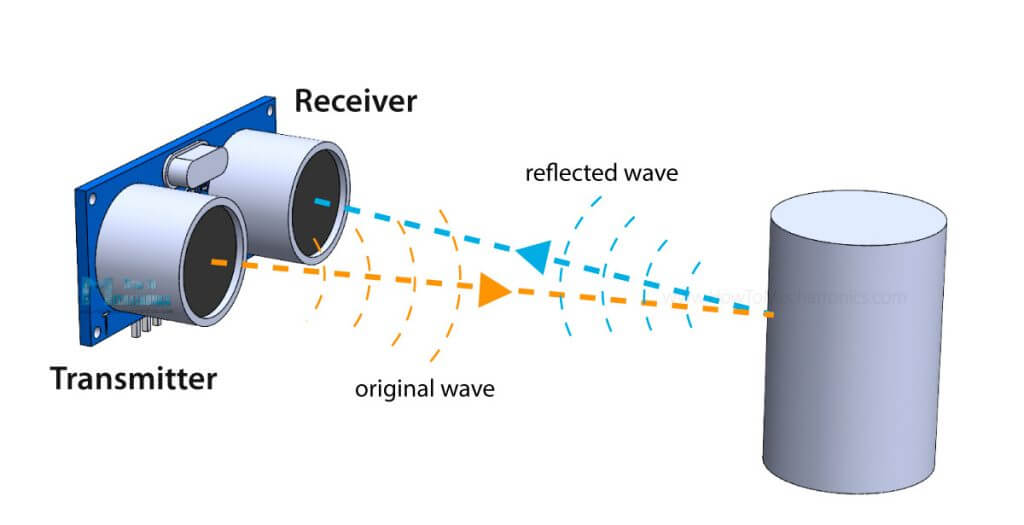
The ultrasonic sensor module is a simple, low-cost sensor used to measure the distance to an object in front of it without any physical contact. It works by sending out a short burst of ultrasonic sound waves from a transmitter and measuring the time it takes for the echo to bounce back off a nearby object and reach the receiver.
- Operating voltage: 5V DC
- Detection range: approximately 2 cm to 400 cm
- Measuring angle: approximately 15 degrees
- Output type: digital pulse (Echo pin, HIGH for the duration of the return trip)
- Separate Trigger and Echo pins for sending and receiving the sound pulse
- Low power consumption, small and lightweight footprint
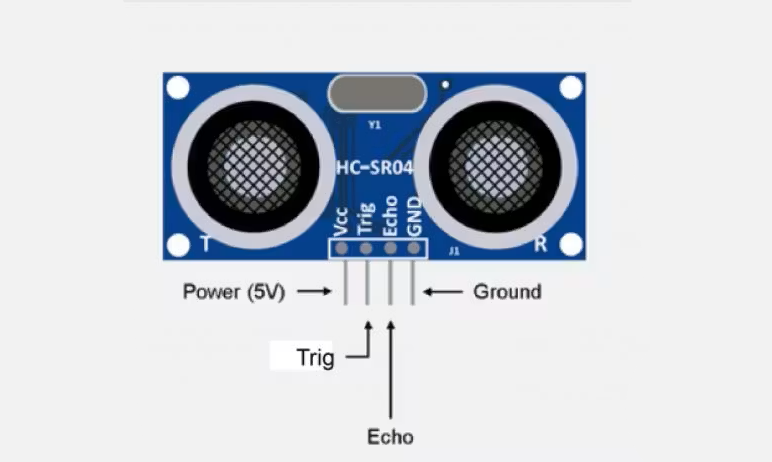
| Pin |
Type |
Description |
| VCC |
Power |
Power supply (5V) |
| Trig |
INPUT |
Trigger pin: send a short 10 microsecond HIGH pulse to start a measurement |
| Echo |
OUTPUT |
Echo pin: goes HIGH for the time it takes the sound wave to return |
| GND |
Power |
Ground connection |
How the Ultrasonic Sensor Works
An ultrasonic sensor measures the distance to a nearby object without any physical contact. It works by sending out a pulse of ultrasonic sound and timing how long it takes for the echo to return.
1
Sending the Trigger Pulse
The microcontroller sends a short 10 microsecond HIGH pulse to the Trig pin. This causes the transmitter to emit a burst of ultrasonic sound waves, which are above the range of human hearing.
2
Sound Wave Travels and Reflects
The ultrasonic sound waves travel outward through the air. When they hit an object in their path, they bounce off the surface and reflect back toward the sensor module.
3
Measuring the Echo
The receiver detects the returning sound wave, and the Echo pin goes HIGH for the entire time between sending the pulse and receiving the echo. This duration is directly proportional to the distance the sound wave traveled.
4
Calculating the Distance
The microcontroller measures how long the Echo pin stayed HIGH using a function such as pulseIn(). Since sound travels at a known speed through air, this duration is converted into a distance by multiplying by the speed of sound and dividing by two, since the pulse travels to the object and back.
Using the Sensor with Arduino
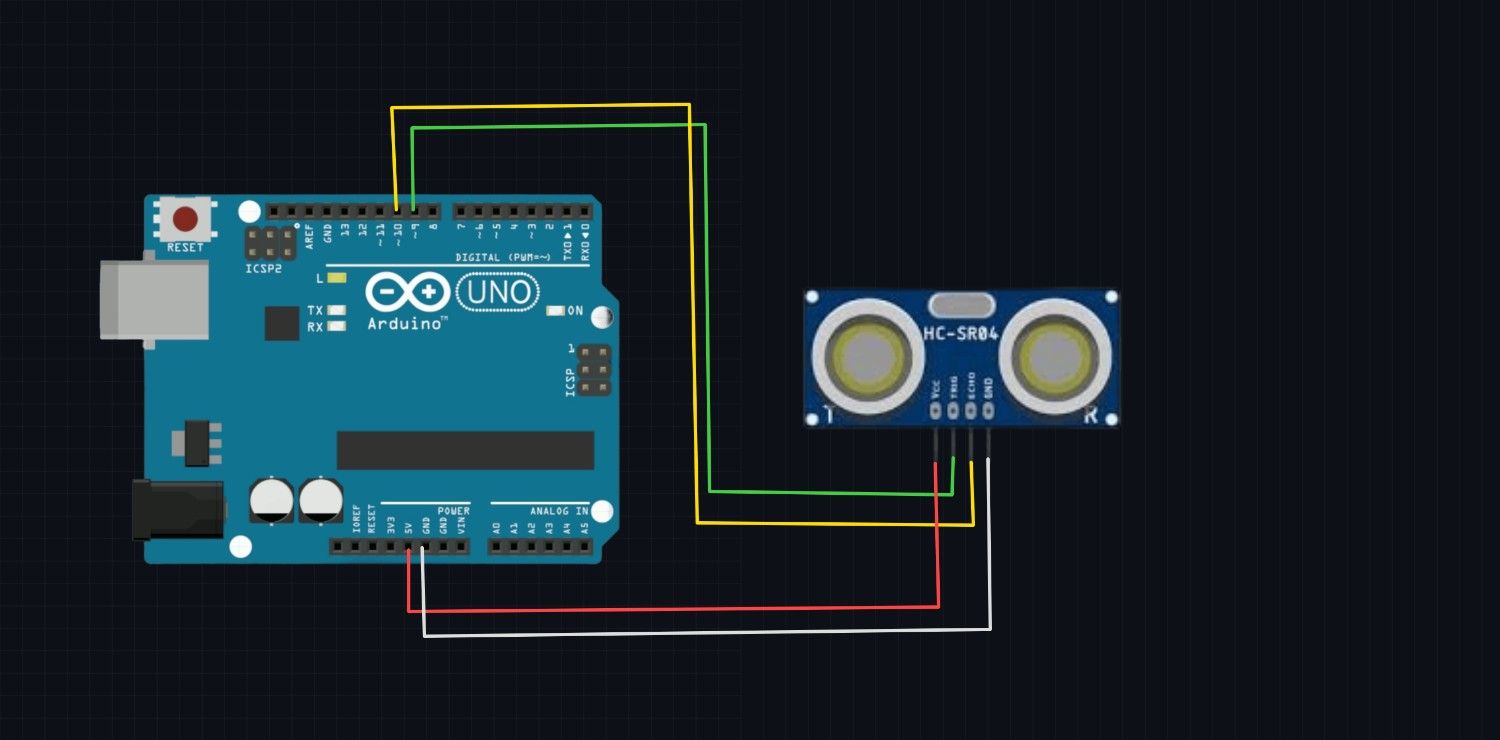
Wiring Ultrasonic sensor to Arduino
| Ultrasonic Sensor Pin |
Arduino Uno Pin |
| VCC |
5V |
| Trig |
D9 |
| Echo |
D10 |
| GND |
GND |
Arduino Script
#define TRIG_PIN 9
#define ECHO_PIN 10

void setup() {
  pinMode(TRIG_PIN, OUTPUT);
  pinMode(ECHO_PIN, INPUT);
  Serial.begin(9600);
  Serial.println("Ultrasonic Sensor Initialized...");
}

void loop() {
  // Send a 10 microsecond HIGH pulse to trigger the sensor
  digitalWrite(TRIG_PIN, LOW);
  delayMicroseconds(2);
  digitalWrite(TRIG_PIN, HIGH);
  delayMicroseconds(10);
  digitalWrite(TRIG_PIN, LOW);

  // Measure the duration the Echo pin stays HIGH
  long duration = pulseIn(ECHO_PIN, HIGH);

  // Convert duration to distance in centimeters
  // Speed of sound ~343 m/s -> 0.0343 cm/microsecond
  // Divide by 2 since the pulse travels to the object and back
  float distanceCm = (duration * 0.0343) / 2;

  Serial.print("Distance: ");
  Serial.print(distanceCm);
  Serial.println(" cm");

  delay(200);
}
The ultrasonic sensor module is a simple and effective way to measure distance without physical contact. By sending out a pulse of sound and timing its echo, it can determine how far away a nearby object is. With its easy-to-read pulse output, it can readily interface with microcontrollers like Arduino for various applications such as obstacle avoidance, parking assist, and liquid-level sensing. Understanding how to wire and program the ultrasonic sensor opens up many possibilities for creating interactive and responsive projects.